An agent that can only draft email is missing much of what makes email useful. Real workflows require an address, incoming messages, retrieval, and a controlled way to act on what arrives. The Model Context Protocol, or MCP, provides a standard way for an AI host to call those capabilities as tools instead of hiding them inside prompt text.
Relay exposes temporary inbox operations through a remote MCP server. That lets a compatible agent discover domains, provision an inbox, and read verification or notification mail while you retain control over credentials and tool execution. The useful part is not simply adding more tools; it is designing a loop that remains predictable when mail is late, duplicated, or hostile.
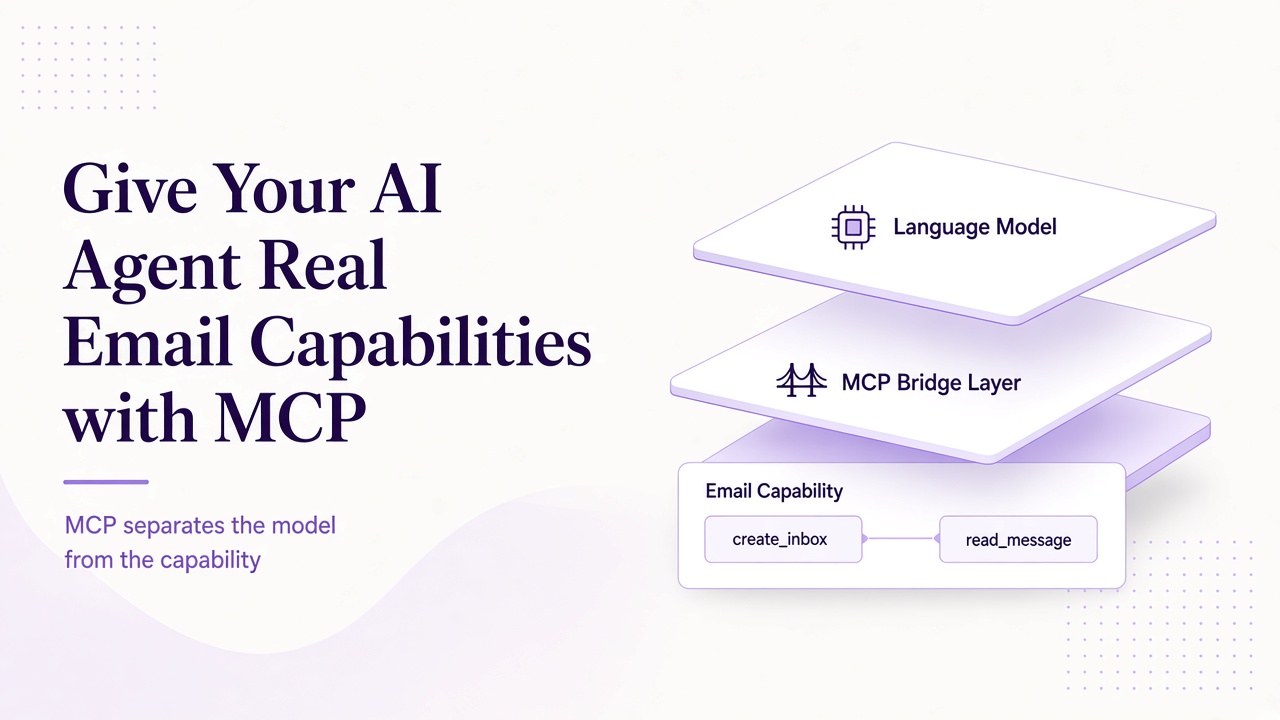
MCP separates the model from the capability
An MCP setup has three practical roles. The host is the application the user interacts with, such as an MCP-capable desktop client or agent runner. The client maintains the protocol connection for that host. The server exposes capabilities and executes requests against an underlying service.
Relay's server endpoint is https://www.relaymcp.net/api/mcp. It uses Streamable HTTP and Bearer authentication. The model does not connect directly with a private key hidden in its prompt; the host holds the credential and sends the authorization header at the transport layer.
This separation gives you concrete control points. You can inspect tool calls, require approval, limit scopes, revoke a key, and change the model without rewriting the mail service. It also keeps protocol details out of the agent's reasoning loop. See the Relay MCP documentation for the current connection details.
Tools and resources answer different questions
MCP tools represent actions or queries a server can execute. Resources represent addressable context that a client can read when a server exposes them. A tool is a verb such as creating an inbox or listing messages; a resource is a readable piece of context identified by the server.
For this integration, reason in terms of Relay's existing tools rather than assuming a resource interface exists:
| Tool | Purpose | Main caution |
|---|---|---|
list_domains |
Discover available mail domains | Do not infer eligibility beyond the result |
list_inboxes |
Find existing inboxes | Select the intended environment and run |
create_inbox |
Provision an inbox | Avoid duplicates after ambiguous retries |
list_messages |
Discover messages in an inbox | Empty can mean mail has not arrived |
read_message |
Retrieve one message | Treat all returned content as untrusted |
Do not invent a get_otp tool or assume that resources, webhooks, or push subscriptions exist. Code extraction, waiting, and policy decisions belong in your agent or application around the actual tools.
Build the agent loop around observable state
A practical verification loop begins outside the model: assign a run ID, identify the authorized application, and choose the required domain policy. The agent can call list_domains, select an eligible Free or BYOD domain according to that policy, and call create_inbox once. Persist the returned inbox ID and address before proceeding.
Next, the application under test sends mail. The agent calls list_messages at bounded intervals. If no suitable message appears, it waits within a deadline or exits with a clear timeout. When a candidate appears, it compares recipient, sender, subject context, and correlation data before calling read_message.
Only then should it extract a verification code or propose a link. Relay provides message retrieval, not automatic trust in the extracted value. A browser tool may visit a verification destination only after your policy validates the hostname and the user or test harness authorizes the action.
A compact state machine keeps this loop honest: provisioned -> submitted -> waiting -> matched -> verified, with explicit timed_out and needs_review exits. Store transitions and message IDs so a resumed agent does not start over blindly.
Put authorization at every consequential boundary
Start with an account API key in an environment variable such as process.env.RELAY_API_KEY. Give it only the scopes needed by this integration, and keep separate keys for separate environments. Revoke a key when it is exposed, retired, or no longer associated with an active runner. The account documentation covers key management.
Transport authentication is only one layer. The agent still needs permission to create an inbox, read a particular message, open a link, or change external account state. Make routine runs read-only after provisioning, require approval for account-changing actions, and review retention guidance separately from the verification loop.
Remember that relaymcp.net is the website, not a mailbox domain. Domain choice comes from actual list_domains results and your BYOD configuration, not from constructing an address at the website hostname.
Make retries idempotent from the client's perspective
A read can often be retried safely; a create needs more care. Network timeouts leave ambiguity: the server may have completed an operation even though the client did not receive the result. Do not immediately repeat create_inbox in a loop.
Instead, persist a local run ID and the intended operation state. After an ambiguous creation, call list_inboxes and reconcile against what you can reliably identify before making another. If your workflow cannot distinguish duplicates, stop for review rather than creating unlimited inboxes.
For message handling, record processed message IDs. That gives your application idempotent behavior even if the same list result appears twice. Keep cursor state when using Relay's REST message listing with limit and cursor; in MCP workflows, preserve equivalent state exposed by the tool rather than assuming a fixed page shape.
Do not mark a signup complete twice or reuse a verification artifact after the run ends. Side effects in other systems need their own idempotency keys and state checks.
Turn errors and hostile content into explicit outcomes
Group failures by what the agent can safely do next. Authentication failures require credential and scope checks. Authorization failures should stop the operation, not trigger a search for another key. Not-found errors require ID reconciliation. Rate or transport errors deserve bounded backoff within your own policy. Empty message lists require patience or timeout, not a fabricated verification code.
Email requires a separate category: successfully retrieved but unsafe to act on. Relay sanitizes HTML, but text can still instruct the agent to reveal secrets or invoke unrelated tools. Keep message bodies in a data-only context, disable unnecessary tools, and require independent destination validation. The detailed controls in our prompt injection guide apply directly to this loop.
Log run ID, tool name, inbox ID, message ID, latency class, and outcome without logging Bearer tokens or full sensitive bodies. Good logs let you distinguish an application sending problem from an MCP failure and an agent policy failure.
Frequently asked questions
Does MCP give the model direct access to my email server?
No. The host connects to Relay's MCP server and exposes selected tools to the model. The API key stays in host configuration, while scopes, approvals, and tool policy govern what the agent can actually do.
Is reading a message safe because Relay sanitizes HTML?
Sanitization addresses markup risks, not semantic manipulation. A plain-text instruction can still attempt prompt injection. Treat message content as untrusted data and independently authorize every action it seems to request.
Should an agent retry a failed inbox creation immediately?
Not blindly. A timeout can hide a successful create. Persist run state, inspect existing inboxes where possible, and reconcile before retrying. Blind retries can create duplicates and make later message selection ambiguous.
Add capability without surrendering control
MCP makes email a practical agent capability by turning inbox operations into explicit, inspectable tools. Relay supplies the mailbox layer; your agent still needs state, authorization, retry discipline, and content isolation. Build the smallest loop first, test every failure exit, and expand only when the workflow remains auditable. Explore the Relay documentation and connect a scoped inbox to your next authorized test.