Email is not just text delivered to a screen. An HTML message can request remote resources, imitate a trusted interface, hide a destination behind a familiar label, and exercise a browser’s complex parsing rules. The message arrives from outside your trust boundary, even when the sender looks familiar.
Sanitization makes that content safer to render by transforming or rejecting markup that violates a policy. It is an essential defense, but it is not a guarantee that every message is honest or harmless. Good email systems combine safe rendering with careful link, image, and attachment handling.
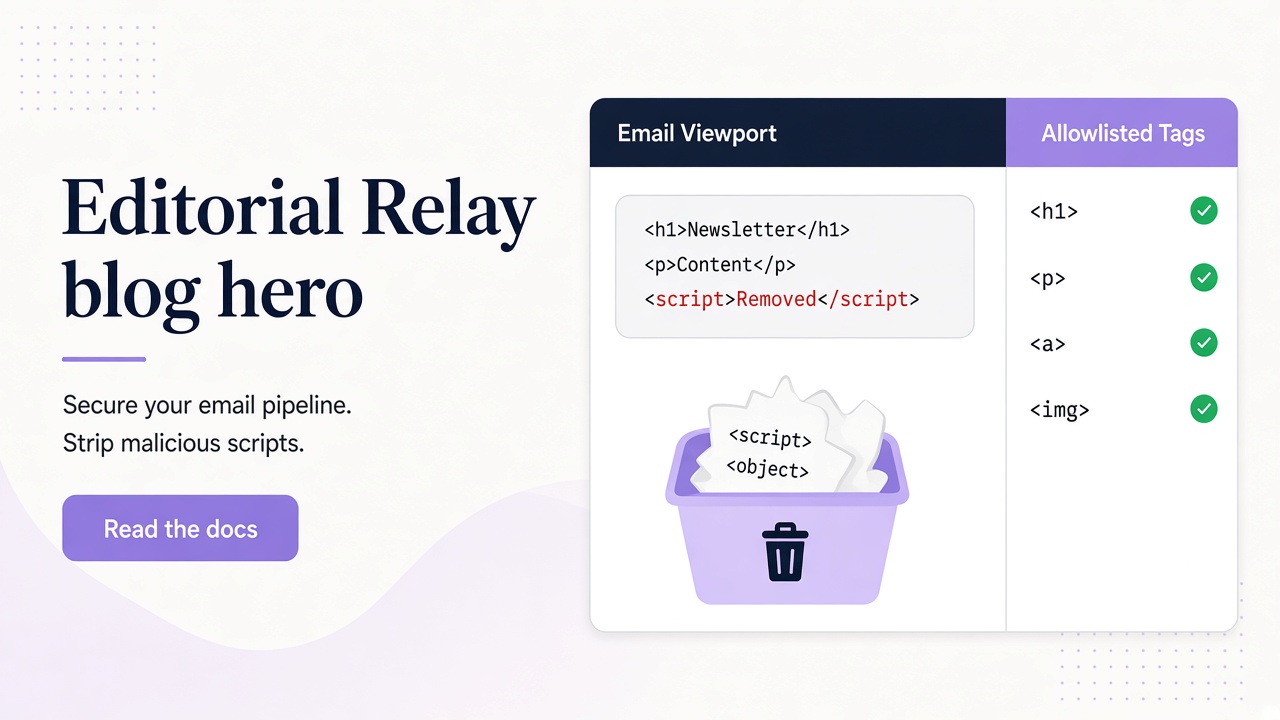
HTML email crosses an active-content trust boundary
A web application normally controls the markup it renders. With email, an external sender supplies part of that markup. If an application inserts it into a page without appropriate processing, the sender may influence the application’s document and security context.
Cross-site scripting is the classic concern. Dangerous constructs can include script elements, event-handler attributes such as onerror, unsafe URL schemes, or browser-specific markup that behaves differently from what a simple filter expects. The payload may be obfuscated across nested tags or character references.
Tracking is another issue. A remote image can reveal that a message was opened and expose network information to the image host. CSS and layout can visually conceal content or make one destination appear to be another. A perfectly rendered message can still be a phishing attempt.
Consider a test worker that reads an inbound email and displays its HTML in an internal dashboard. If raw markup reaches the dashboard, a message submitted through a public sign-up form could become an attack on the person reviewing it. The inbox is an input channel, not a source of trusted templates.
Allowlist HTML instead of chasing every dangerous pattern
A robust sanitizer starts with a policy describing the small set of tags, attributes, and URL schemes needed for legitimate email. Everything outside that allowlist is removed or handled according to a deliberate rule. This is safer than maintaining only a denylist of known attacks.
For example, a renderer may permit basic paragraphs, headings, lists, tables, and a restricted set of inline styles while rejecting scripts, forms, embedded documents, and event handlers. URL handling needs equal care: permitting an href attribute is not enough if its scheme or destination handling is unsafe.
Parsing must happen as HTML, not as a sequence of regular-expression replacements. Browsers recover from malformed markup in nuanced ways. A string replacement that removes one literal script spelling can miss nested, encoded, or differently tokenized variants.
Sanitization should occur before rendering, with output treated according to the security context where it will appear. If sanitized content is later modified by other code, that pipeline needs review too. Relay sanitizes message HTML before display and uses a scriptless sandbox as an additional rendering boundary; the message documentation describes the available plain-text and sanitized HTML fields.
Treat images, links, and attachments as separate risks
HTML sanitization addresses markup, but a safe tag can still refer to an untrusted resource. Remote images deserve a specific policy. Blocking or proxying them can reduce automatic tracking, while allowing them to load directly can disclose an open event to the sender’s server. Relay strips tracking pixels and forms, but users should still treat visible remote content and sender behavior cautiously.
Links require human and technical scrutiny. Check the actual destination, not just the anchor text. Look for misleading subdomains, unexpected URL shorteners, and requests to re-enter credentials. An allowlisted a tag does not prove that its destination belongs to the claimed organization.
Attachments are outside the HTML sanitizer’s protection. A document, archive, or executable can be dangerous even when the surrounding message contains only plain paragraphs. Do not assume that an attachment is safe because it arrived in a sanitized email. Validate expected file types, use appropriate scanning in your own environment, and avoid opening unexpected files.
For automation, retrieve attachments deliberately rather than treating every message resource as executable input. Relay exposes attachment metadata with messages and a separate attachment endpoint; keep credentials out of logs when integrating the REST API.
Use CSP and sandboxing as defense in depth
Content Security Policy can restrict what a rendered document is allowed to load or execute. Depending on the deployment, a policy may disallow scripts, limit image sources, prevent framing, or block form submission. CSP is most useful when designed for the exact rendering context rather than copied as a broad header.
Sandboxing provides another boundary. A sandboxed frame can isolate message content from the parent application and omit capabilities such as script execution. The host application should still avoid placing sensitive data or privileged controls inside that untrusted document.
These layers address different failures. Sanitization reduces dangerous markup before display. Sandboxing limits what rendered content can do. CSP restricts resource and execution behavior. None of them establishes that a sender is truthful or a link is safe.
Operational controls matter as well. Avoid rendering inbound HTML with administrative privileges, keep browser and parser dependencies maintained, and ensure logs do not leak message contents or API keys. A safer viewer should reduce the consequences of malicious input without encouraging users to lower their guard.
Test with adversarial and ordinary messages
Sanitizer testing should verify both security and preservation of legitimate formatting. Build fixtures that represent expected newsletters, transactional mail, plain-text fallbacks, tables, and international text. Then add adversarial cases based on the policy you intend to enforce.
Useful cases include:
- A
scriptelement and an element with anonerrorhandler, which should not survive as executable markup. - A link using a disallowed URL scheme, which should be removed or neutralized.
- A form, frame, or embedded object, which should not gain interactive capabilities.
- Malformed nesting and encoded characters, which should be parsed consistently rather than filtered by string matching alone.
- A remote image, whose handling should match the product’s tracking and privacy policy.
- A benign table with permitted attributes, which should remain readable after sanitization.
Assert properties of the output, not merely the absence of one exact payload. Confirm that no event attributes or active embeds remain, and inspect the rendered result in the intended sandbox. Include regression tests whenever the allowlist or parser changes.
If agents read messages through the MCP interface, apply the same principle in downstream prompts and tools: message content is data, not instructions. Sanitized HTML does not make prompt injection, phishing text, or malicious attachments impossible.
Frequently asked questions
Does sanitized HTML make an email completely safe?
No. Sanitization reduces markup-based risk, but it cannot prove sender intent, make a phishing link trustworthy, or guarantee that an attachment is harmless. Combine it with sandboxing, resource controls, user verification, and appropriate attachment handling.
Is plain text always enough for safe email rendering?
Plain text avoids HTML rendering risk, but it can still contain phishing links, deceptive instructions, or untrusted content for an automated agent. It is a useful safer representation, not a complete trust decision. Attachments and URLs still require separate controls.
Why not remove every tag and image from every message?
Strict reduction can be appropriate for some workflows, but many legitimate messages rely on basic formatting for readability. An allowlist aims to preserve useful structure while excluding active or unnecessary capabilities. The right policy depends on the audience and threat model.
Make message inspection a safer default
HTML sanitization matters because email turns an outside sender’s markup into something your application may render. A clear allowlist, safe parsing, controlled resources, and layered browser defenses reduce that risk.
Relay provides plain text and sanitized HTML for message inspection, with API and MCP access for controlled workflows. Review the security model, keep testing adversarial content, and compare public and private inbox risks before trusting any mailbox with sensitive data.