YOPmail makes receiving disposable email unusually simple: choose a name, open the webmail, and read messages without registration. Relay is designed for a different operator—a developer or AI agent that needs to create, list, and inspect inboxes through an API or MCP. YOPmail's non-expiring inboxes and reply support are meaningful strengths, while its lack of inbox passwords changes what can safely be tested.
This comparison is about authorized application testing and agent workflows, not anonymous communication or evading third-party controls. It also distinguishes an inbox that continues to exist from messages that remain available inside it.
How the official sources were assessed
YOPmail's official English service page and privacy policy were reviewed on October 28, 2026. Relay's documented API, MCP, domain, retention, and access features provide the other side of the comparison. No deliverability claim, speed measurement, or unsupported limit is included.
Not documented means a capability was not established by the reviewed official material; it does not establish that the capability is unavailable. Not available and no are used only when official text explicitly excludes the behavior. For example, YOPmail explicitly says its inboxes are not password protected, but the absence of an attachment API statement is treated as not documented rather than proof that attachments cannot be received.
Feature comparison
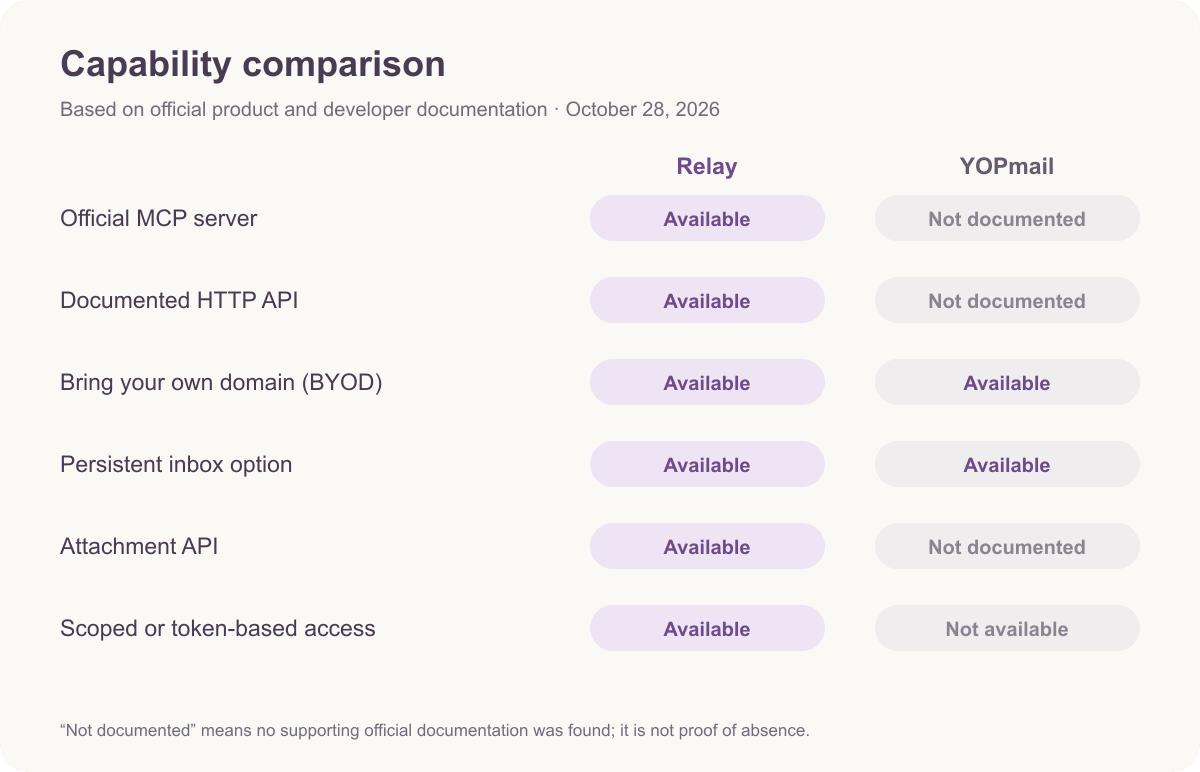
| Capability | Relay | YOPmail |
|---|---|---|
| Official MCP server | Yes: named inbox and message tools | Not documented |
| Documented HTTP API | Yes: REST with Bearer authentication | Not documented on the reviewed official page |
| Bring your own domain | Yes: NS or MX, public or private | Yes, adding a domain is advertised; implementation and eligibility are not documented |
| Persistent inbox option | Yes: no fixed inbox expiry | Yes: inboxes do not expire; messages are retained for eight days |
| Attachment API | Yes | Not documented |
| Scoped or token-based access | Yes: scoped, revocable keys plus ownership | No inbox password or authentication; unique names and aliases are recommended |
| Reply to a message | Not available | Yes |
| Send to arbitrary external addresses | Not available | Anonymous sending is prohibited; YOPmail-to-YOPmail sending is allowed |
| Registration | Account and key model for API/MCP | No registration for webmail |
A browser-first service can be excellent for a person performing a quick check while being a poor fit for an unattended agent. Conversely, an API-first service adds setup that may be unnecessary for a single manual test.
The workflow difference is bigger than the transport
Relay exposes a remote MCP server at https://www.relaymcp.net/api/mcp. Its tools are list_domains, list_inboxes, create_inbox, list_messages, and read_message. An MCP-compatible agent can discover a domain, create an inbox, associate its ID with a test run, and poll for the expected signup or notification message. A human approval policy can gate subsequent browser actions. The Relay MCP guide covers the connection model.
Developers who do not need MCP can use the REST base https://www.relaymcp.net/api/v1 with a scoped, revocable Bearer key. This supports a conventional CI worker or custom agent runner while keeping inbox creation and message reads under the same credential model. The API documentation should be used for exact request schemas.
YOPmail's reviewed official page documents webmail use rather than an official API. No official HTTP API, SDK, webhook, MCP, or AI-agent feature was found. That does not prove that no unofficial client exists; it means an engineering team cannot treat an unofficial wrapper as a supported YOPmail contract. For a dependable automated suite, a browser scraper would also introduce selectors, session handling, and UI-change risk that a documented API avoids.
This makes Relay the clearer choice when the test itself must own the mailbox lifecycle. YOPmail remains simpler when a person can open the inbox and complete the task without programmatic retrieval.
Eight-day messages and non-expiring inboxes are not the same
YOPmail explicitly says inboxes already exist, are never deleted, and do not expire. Messages are kept for eight days and can be manually removed. This is a useful middle ground between very short-lived disposable mail and an indefinitely persistent message store: the address remains available, but old evidence does not necessarily remain in it.
Relay has no fixed inbox expiry. That is helpful when a test has several stages or a failure needs later inspection, but it should not be described as permanent archiving. Teams should define their own cleanup and evidence-retention policies on either service. If a message matters for an audit, save the required test record somewhere controlled rather than relying on a disposable inbox.
YOPmail's eight-day window can be an advantage for manual tests that should clean themselves up without a one-hour deadline. Relay's model is more suitable when the workflow needs persistence without a documented fixed message-expiry window. Neither statement predicts whether a particular third-party sender will deliver successfully.
Access control and privacy determine safe test data
YOPmail states that temporary inboxes are not password protected. It recommends choosing a unique inbox name or using an alias for additional confidentiality. A hard-to-guess name may reduce casual discovery, but it is not the same as authentication, granular authorization, or credential revocation.
Relay supports guest inbox passwords and account ownership, alongside scoped, revocable Bearer keys. This is a better documented boundary for tests where a message contains a sensitive magic link or where different runs should not share an openly named mailbox. Operators should still place keys in secret storage and restrict which MCP tools an agent may invoke; the account controls are part of that setup.
YOPmail's privacy policy says it may collect email and usage data, including IP, device, and browser information, use cookies, and share information with service providers and other listed categories. It also warns that information shared in public areas may be visible to all users. Its no-registration model therefore should not be translated into “no data collection.”
On both services, use synthetic identities and avoid confidential production mail. Relay sanitizes HTML, which helps handle markup but does not neutralize malicious instructions written in plain text. An AI agent must validate sender, subject, run identifier, and link destination before acting on anything it reads.
Replies, domains, and undocumented details
YOPmail supports replying to messages. It prohibits anonymous outbound email to arbitrary recipients but allows sending from one YOPmail address to another. If a manual test includes a reply step or an internal YOPmail-to-YOPmail exchange, YOPmail has a capability Relay does not provide. These restrictions should not be generalized into unlimited outbound sending.
YOPmail also advertises “Add your own domain name” and receiving messages there. The reviewed official page did not establish implementation, eligibility, public/private behavior, or price for that option. Relay documents BYOD through either NS or MX and supports public and private domains. If DNS architecture is central, Relay's domain documentation provides the more specific reviewed path.
Attachment support and limits were not documented in the reviewed YOPmail source, and no attachment API was found. Relay documents an attachments API. The accurate conclusion is not that YOPmail can never display an attachment; it is that a developer should not design an automated attachment pipeline around undocumented behavior.
YOPmail describes its service as free, and no paid pricing tiers or numeric request limits were found in the reviewed official pages. No price is assigned to its custom-domain option here.
Recommendation and verdict
Choose Relay when an AI agent or test runner needs documented inbox provisioning and retrieval, when scoped keys and guest-password/account ownership matter, when attachment retrieval is part of the test, or when you need clearly documented NS/MX domain options. Relay is especially appropriate for repeatable authorized signup and notification tests.
Choose YOPmail when a human needs free, no-registration webmail, values an address that does not expire, wants an eight-day message window, or needs replies and YOPmail-to-YOPmail sending. It is a strong manual option for low-sensitivity fixtures, provided the lack of inbox passwords is acceptable.
Relay does not currently offer official SDKs, webhooks, SSE, automatic OTP extraction, or send/reply. A Relay agent must poll and interpret messages within your own application, and an outgoing-mail test needs another tool. The verdict is consequently split: Relay is stronger for controlled, programmable agents; YOPmail is stronger for convenient browser-based reading and reply workflows.
Frequently asked questions
Does YOPmail delete the inbox after eight days?
No. YOPmail says messages are kept for eight days, while inboxes do not expire and can be manually cleared. The address lifecycle and message-retention window are separate facts.
Can I automate YOPmail through an official MCP or REST API?
No official API or MCP documentation was found on the reviewed service page. That is a documentation finding, not proof that no unofficial tooling exists. Relay provides documented REST and remote MCP interfaces.
Is a unique YOPmail inbox name equivalent to a password?
No. YOPmail recommends a unique name or alias because inboxes are not password protected. That may make an address harder to guess, but it does not provide the same access-control model as Relay's passwords, ownership, and revocable keys.
Sources and review notes
Reviewed October 28, 2026. YOPmail's official service page supports several distinct claims, linked separately below for review clarity.