You do not need to operate a mail server just because a workflow begins with an email. A temporary Relay inbox can receive the message, while Zapier or Make handles scheduling, transformation, and delivery to the tools your team already uses. The connection is a generic HTTP request, not a custom mail service.
That simplicity is useful, but it does not remove distributed-systems problems. You still need to know when new mail is discovered, how duplicates are handled, where credentials live, and what happens when a destination fails. This guide builds a maintainable pattern for both platforms without claiming that either has a native Relay app or module.
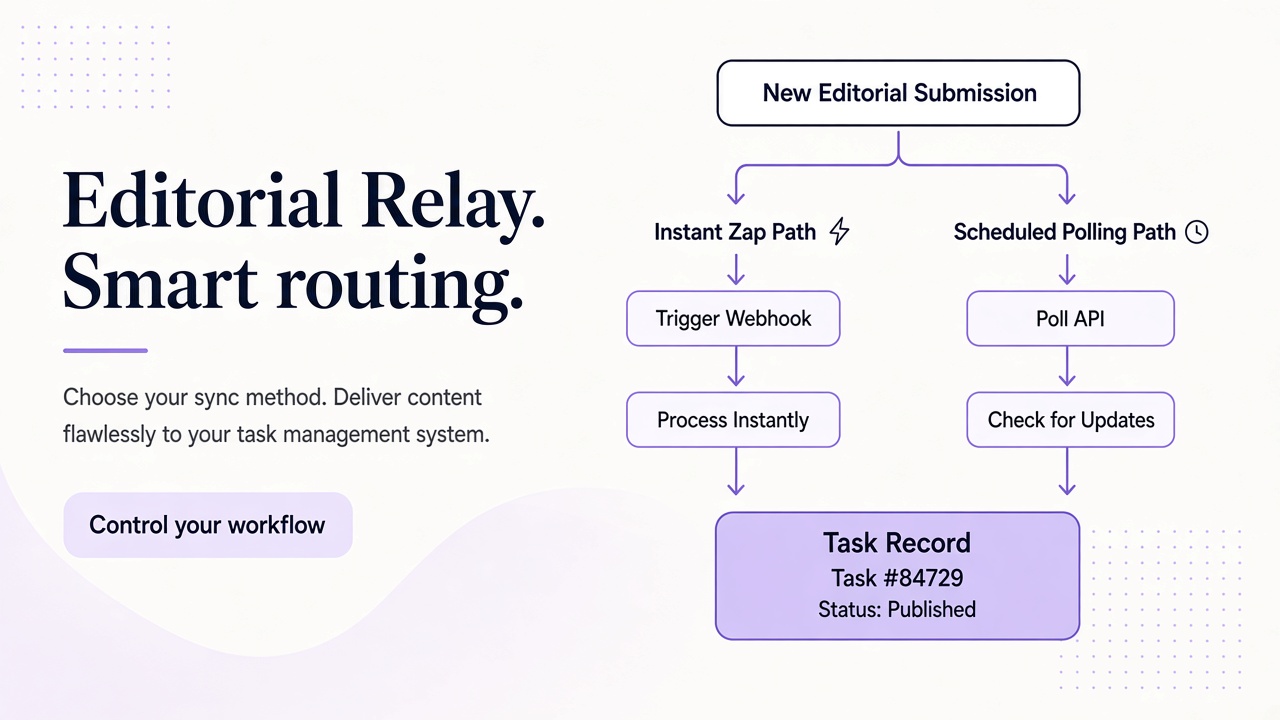
Choose between webhooks and scheduled polling
The words “webhook” and “email automation” often appear together, but they solve different problems. A webhook is an HTTP callback sent by a source when an event occurs. Polling is a scheduled request that asks the source what is available.
Relay does not currently advertise email webhooks. With Relay as the source, use scheduled polling against the REST API. A Catch Hook trigger in Zapier or a Custom webhook in Make can accept an event from some other system, but it will not cause Relay to push new mail to that URL.
A practical architecture is therefore:
Schedule → list Relay messages → deduplicate → read full message → transform → destination action
Polling introduces some delay between delivery and processing. That is acceptable for many workflows, including daily receipt collection, QA triage, and form-notification routing. If you need strict real-time behavior or guaranteed exactly-once delivery, a general-purpose automation scenario is not the right abstraction without additional infrastructure.
For n8n, the same principles apply with self-hosted scheduling and workflow state. See the companion n8n email-to-task guide for that implementation.
Prepare the Relay inbox and API request
Use the Relay API reference with base URL https://www.relaymcp.net/api/v1. Authenticate with Authorization: Bearer and a scoped, revocable key. Call GET /domains, choose an appropriate Free mail or BYOD domain, then call POST /inboxes to create the test or workflow inbox. Save its ID.
Remember that Relay provides inboxes on separate mail domains. The relaymcp.net website itself never issues mailboxes. If your organization needs a recognizable address under its own domain, configure that domain first using the domain documentation.
The core polling request is GET /inboxes/:id/messages, with limit and cursor used for pagination. For each message that needs full processing, call GET /inboxes/:id/messages/:messageId. Keep these as two explicit steps: listing is discovery, while reading supplies the content you intend to transform.
Do not place an API key directly in a Zap title, Make scenario note, URL, or body template. Provision the key through the platform's managed credential or secret facility, sourced in your own deployment or development environment from process.env.RELAY_API_KEY. Reference that secured value in the Authorization header and exclude it from logs and shared exports.
Build the Zapier version with generic steps
A Zapier implementation can use Schedule by Zapier as its trigger and Webhooks by Zapier for the GET requests. These are generic building blocks; no native Relay connector is required.
- Schedule the Zap at an interval appropriate for the workflow.
- Send the list-messages request with the inbox ID and a bounded limit.
- Parse the JSON response and create one item per message.
- Check a deduplication store for each message ID.
- Request the full message for IDs not yet processed.
- Map a compact result into the destination app.
- Record the message ID and destination record ID after success.
Zapier's looping, storage, or code capabilities can support these steps, but choose based on your plan and the volume you expect. Keep one source of truth for deduplication. A subject-line filter is not enough because repeated subjects are common.
For a concrete example, imagine a staging application sends a password-expiry notice to a QA inbox. The Zap polls Relay, reads the new message, extracts only fields your own expected template defines, and creates a row in a QA review table. It should not execute links or follow instructions embedded in the email. Relay sanitizes HTML, but all email remains untrusted input.
Test pagination rather than assuming the first response contains every message. If your Zap cannot safely hold pagination and deduplication state in one execution, split discovery and processing into separate Zaps with a controlled queue between them.
Build the Make scenario with explicit state
In Make, start with a scheduled scenario and the generic HTTP “Make a request” module. Point it at the Relay list-messages endpoint and configure the same Bearer authentication through secure scenario credentials.
Add an iterator only after the response has been parsed into message objects. For each object, query a Make data store or another controlled database by message ID. New IDs continue to a second HTTP module that reads the full message; known IDs stop. A router can then send different approved message types to different destinations.
For example, one route might create a calendar-review item when the sender matches an approved notification address, while another sends all remaining messages to a manual triage queue. Sender matching is a routing hint, not proof of identity, because sender fields can be forged.
Make's visual execution history is useful during debugging, but message bodies can contain personal data or reset links. Limit retained input and output bundles where possible, restrict scenario access, and avoid logging authorization headers. Keep API and destination errors visible without copying secrets into a team chat.
A good Make scenario records a state transition only after the destination confirms success. If it times out, reconcile by searching for the stored source message ID before creating another record.
Plan for the limits of low-code email automation
Polling is simple, but production behavior depends on details that a five-minute demo hides.
| Concern | Practical control |
|---|---|
| Duplicate delivery | Deduplicate on immutable Relay message ID |
| Multiple pages | Follow returned cursors until the listing is complete |
| Overlapping runs | Prevent concurrency or use an atomic external store |
| Partial failure | Save per-message and per-destination state |
| Credentials | Use scoped, revocable keys and managed secrets |
| Hostile content | Treat bodies, links, and attachments as untrusted |
| Message retention | Review documented lifecycle guidance and minimize copied data |
Both platforms count work according to their own pricing and execution models. Multiple HTTP calls per message can consume more operations than a single destination action, so inspect actual usage rather than estimating from email count alone. API limits and platform limits also apply; use conservative schedules, bounded batches, and retries with backoff. Respect Retry-After when supplied.
Retention deserves separate treatment. A processing scenario should not assume that handling a message or switching Relay addresses removes stored mail. Minimize copied data, review the privacy policy, and contact support for lifecycle and data-handling questions.
Frequently asked questions
Can Zapier or Make receive instant webhook events from Relay?
Relay does not currently provide email webhooks for this workflow. Use a scheduled trigger and generic HTTP GET requests to poll messages instead.
Should the scenario process attachments automatically?
Only when the workflow genuinely requires them. Relay exposes attachment downloads by inbox and attachment ID; apply strict size, type, scanning, and storage rules, and never execute downloaded files.
Is a no-code scenario suitable for every email workload?
No. High-volume, low-latency, or complex transactional workflows may need a dedicated service with durable queues and stronger delivery semantics.
Automate one measurable outcome first
Zapier and Make are effective Relay clients when the workflow is deliberately narrow. Pick one inbox, one message type, and one destination. Then prove pagination, deduplication, retries, and secret handling before expanding.
Create a scoped key in your Relay account, build the generic list-and-read sequence, and run it against known test messages. You will get the speed of no-code automation without pretending that email delivery is instantaneous, exactly once, or inherently trustworthy.